
Download FreedomGPT – Private Offline AI Assistant for Windows
Overview
FreedomGPT is a groundbreaking Windows‑only AI application that lets you run a powerful language model entirely on your local machine. Unlike cloud‑based services such as ChatGPT, FreedomGPT never sends your prompts or data to an external server, guaranteeing 100 % privacy. The program is designed for users who value security, speed, and offline accessibility.
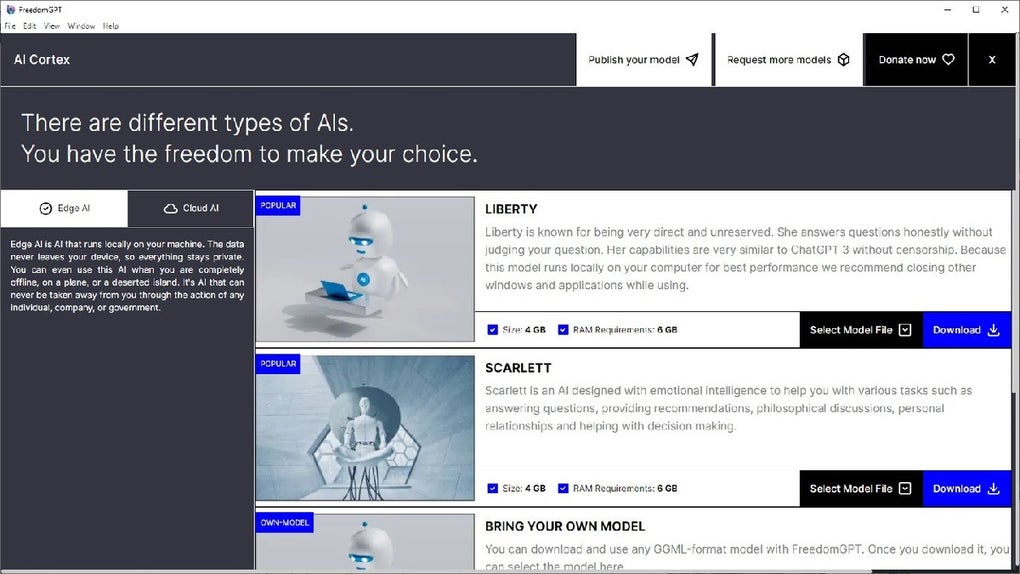
After a quick installation, you can launch the interface and choose between two built‑in personalities: Liberty, a straightforward, no‑frills assistant, and Scarlett, an emotionally aware model that can respond with tone and empathy. Each model occupies roughly 5 GB of disk space, and advanced users have the option to import their own custom models, turning FreedomGPT into a flexible platform for a wide range of AI‑driven tasks. Whether you need a private research assistant, a coding helper, or a conversational companion, FreedomGPT delivers a fast, smooth experience without ever requiring an internet connection.
Core Features & Capabilities
- Full Offline Operation – No internet required after installation, keeping all interactions private.
- Two Ready‑Made AI Personas – Liberty for concise answers, Scarlett for emotionally nuanced replies.
- Custom Model Import – Supports user‑supplied models in common formats, expanding functionality.
- Lightweight Footprint – Each bundled model is about 5 GB, manageable for most modern PCs.
- One‑Click Activation – The “Connect AI” button instantly launches the chosen model.
- Secure Data Handling – All prompts stay on your device; no logs are transmitted.
- Fast Response Times – Local processing eliminates network latency, delivering near‑instant answers.
- Regular Updates – The development team releases periodic model improvements and bug fixes.
FreedomGPT’s architecture is built on an optimized inference engine that balances CPU and GPU usage, allowing smooth operation on mid‑range laptops as well as high‑end workstations. The UI is deliberately simple: a clean text box, a “Connect AI” dropdown, and a history pane that stores conversations locally. Users can export their chat logs for personal archiving, but the app never pushes these files to the cloud unless you explicitly choose to share them. This combination of privacy‑first design and user‑friendly features makes FreedomGPT a compelling alternative for anyone who wants the power of a large language model without surrendering data sovereignty.
Installation, Usage & Compatibility
Step‑by‑Step Installation
Installing FreedomGPT is intentionally straightforward. After downloading the installer from the official website, follow these steps:
- Run the
FreedomGPT_Setup.exefile and accept the license agreement. - Select the destination folder (default is
C:\Program Files\FreedomGPT). - Choose which bundled model(s) you want to install – Liberty, Scarlett, or both.
- Click “Install” and wait for the files to copy (typically 5‑7 minutes).
- When the wizard finishes, launch FreedomGPT from the desktop shortcut or start menu.
The installer automatically detects your system’s hardware capabilities and configures the inference engine for optimal performance. If you have a compatible NVIDIA GPU, the installer will enable CUDA acceleration; otherwise, it falls back to CPU‑only mode without compromising functionality.
First‑Run Usage
Upon opening the app, you’ll see a clean dashboard with a “Connect AI” button. Click it to select either Liberty or Scarlett. After the model loads (usually under 30 seconds), type your query into the text field and press Enter. The response appears instantly in the conversation pane. You can switch models at any time without restarting the application – FreedomGPT unloads the current model and loads the new one on demand.
For power users, the “Import Model” option in the settings menu allows you to point the app at a local .bin or .gguf file. Once imported, the model appears in the “Connect AI” list alongside the default personas. This flexibility makes FreedomGPT suitable for developers who want to experiment with fine‑tuned or domain‑specific models.
Operating System Compatibility
FreedomGPT is built exclusively for Windows 10 (64‑bit) and newer. The minimum system requirements are:
- CPU: Intel Core i5 (8th gen) or AMD Ryzen 5 equivalent
- RAM: 8 GB (16 GB recommended for larger custom models)
- Storage: 10 GB free space for the application and default models
- GPU: Optional NVIDIA GTX 1060 or better for CUDA acceleration (CPU‑only works as well)
Pros & Cons
- Pros
- Complete offline operation ensures maximum privacy.
- Fast response times without network latency.
- Two ready‑made AI personalities cover a wide range of use cases.
- Ability to import custom models adds extensibility.
- Simple, one‑click UI suitable for non‑technical users.
- Cons
- Limited to Windows; no native macOS, Linux, Android, or iOS versions.
- Model size (5 GB each) may be heavy for low‑storage devices.
- Initial setup requires downloading large model files, which can be bandwidth‑intensive.
- Advanced customization (e.g., fine‑tuning) is not built into the UI.
FAQ – Frequently Asked Questions
Is FreedomGPT really 100 % offline?
Yes. After the initial download and installation, all processing occurs locally on your computer. No prompts, logs, or model data are ever sent to external servers.
Can I use FreedomGPT on a laptop without a dedicated GPU?
Absolutely. The software automatically falls back to CPU inference if a compatible GPU is not detected. While response times may be slightly slower, the experience remains smooth for most everyday tasks.
How do I update FreedomGPT to the latest version?
The app includes a built‑in updater. When a new release is available, a notification appears in the dashboard. Clicking “Update” downloads the patch and restarts the application automatically.
Is there a free trial or a paid license?
FreedomGPT offers a free version with the two default models. A paid “Pro” license unlocks additional premium models, priority updates, and technical support. Pricing details are listed in the offers section below.
Can I export my conversation history?
Yes. The “Export Chat” button saves the current conversation as a plain‑text or JSON file, which you can store locally or share at your discretion.
Overall Rating: 4.5 / 5
Pros: Privacy‑first design, fast offline performance, intuitive UI.
Cons: Windows‑only, model size, limited built‑in customization.
Conclusion & Call to Action
FreedomGPT fills a critical niche for users who demand an AI assistant that never leaves their device. By combining robust offline capabilities with an easy‑to‑use interface, the software offers a compelling blend of security, speed, and flexibility. While the Windows‑only restriction may limit adoption for some, the performance gains and peace of mind outweigh that drawback for many professionals, developers, and privacy‑conscious individuals. If you’re looking for a secure, fast, and customizable AI tool that respects your data, FreedomGPT is worth a try.
Ready to experience private AI on your Windows PC? USD 0.00 – download the free version now and explore the power of offline intelligence. Upgrade to the Pro license later for premium models and priority support.







